
You want to find oak in a printed dictionary. Starting with the first word and turning every page would work, but you already know something more useful: the words are in alphabetical order. Open around the middle and read a word there. If it is hazel, oak cannot come before it. You can set aside everything earlier and keep looking after hazel.
Binary search turns that ordinary move into a precise rule. Compare what you want with the middle item of an ordered collection. Keep only the half that could still contain it, and repeat. Each comparison makes the remaining search much smaller.
Why alphabetical order matters
The dictionary’s order lets you reject a whole range after reading just one word. If oak comes after hazel, it cannot be on a page before hazel. Without that order, the middle word tells you nothing about the words on either side.
A computer can use the same idea with a list of words or names kept in order. Unlike someone leafing through a book, it can jump straight to a numbered entry. That entry tells it which part of the list to keep searching.
The dictionary shows the essential parts of the method: the alphabetical order, the word checked near the middle, and the half you can set aside. The computer follows the same pattern with exact positions.
Find one word
Imagine a very small dictionary containing these 15 entries, in order:
| Position | Word |
|---|---|
| 1 | apple |
| 2 | birch |
| 3 | cedar |
| 4 | daisy |
| 5 | elm |
| 6 | fern |
| 7 | grape |
| 8 | hazel |
| 9 | iris |
| 10 | juniper |
| 11 | kiwi |
| 12 | lilac |
| 13 | maple |
| 14 | oak |
| 15 | pine |
Search for oak. The middle of positions 1–15 is position 8, hazel. Since oak follows hazel, positions 1–8 can all be discarded. Only positions 9–15 remain.
The middle of 9–15 is position 12, lilac. Oak follows lilac, so discard positions 9–12. Only positions 13–15 remain.
The middle is now position 14, oak. Found—after checking just three entries.
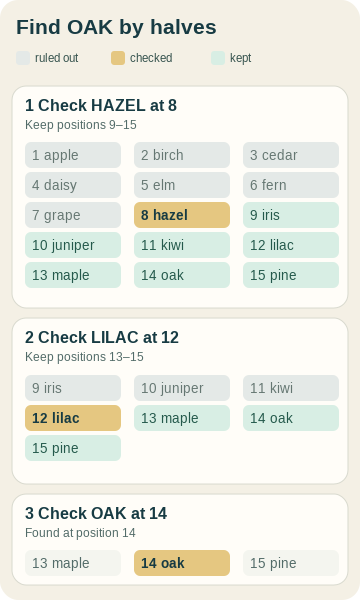
Each panel shows the words in the current range. Grey words are ruled out by the comparison, gold marks the word checked, and green marks the words kept for the next check. The final panel highlights the match.
The same rules also establish when a word is absent. Search these entries for lime. After hazel and lilac, the next middle word is oak. Because lime comes before oak, only maple remains. Lime comes before maple too, so there are no possible positions left. The answer is “not found,” not a guess based on a nearby word. The search also locates the place to insert lime: between lilac and maple, at position 13.
Why the search stays short
With 15 entries, the first check leaves at most seven possibilities. The next leaves at most three, then at most one. Even if the word is absent, four checks are enough to settle the question.
The same pattern works for much larger lists. Searching a list of a million entries takes no more than 20 checks. Each time you double the size of the list, you add only about one more check. A search from the beginning, by contrast, might have to read every entry. Steven Skiena’s binary-search lecture explains this repeated halving.
The comparison assumes you can reach the middle entry quickly. A printed dictionary helps us picture the idea, but opening it at the exact middle word is awkward: pages hold different numbers of words, and turning pages takes time. A computer can jump to a numbered entry in a suitable list.
How the idea developed
The method of narrowing an ordered range is older than electronic computers. In 1946, John Mauchly gave a Moore School lecture on sorting and collating. Donald Knuth’s historical account identifies Mauchly’s discussion as an early published mention of binary search. The lecture was given in 1946; Manchester’s publication history dates the volume containing it to 1948.
Describing the idea was easier than writing a version that handled every list length. According to Knuth, D. H. Lehmer’s 1960 paper apparently contained the first published version that worked for any number of entries. Hermann Bottenbruch presented another version in a 1961 technical report that appeared as a 1962 journal article, Structure and Use of ALGOL 60. A program must take care at the edges of each remaining group: it must neither skip the word it wants nor keep checking the same word forever.
When to use it
Binary search helps when a computer has an ordered list whose entries it can reach directly: for example, a roster sorted by name or a catalogue sorted by product code. It can also show where a new name or code belongs, even if that exact entry is missing.
Keeping the order takes work. If a new name is added to a long roster, other entries may need to move to make room. If the entries cannot be reached directly and must be read one by one, checking the middle loses much of its advantage. Binary search is most useful when the list is already ordered and searching it matters more than changing it.
The dictionary shows why binary search is powerful and what it requires. One comparison can dismiss half the possibilities, but only when the items are ordered and the next middle item is easy to reach.
Sources
- Donald E. Knuth, The Art of Computer Programming, Vol. 3, §6.2.1: history of Mauchly, Lehmer, and Bottenbruch.
- University of Manchester, Moore School lecture list and publication history: lecture dates, Mauchly’s lecture, and the later publication of the volumes.
- Hermann Bottenbruch, Structure and Use of ALGOL 60 (1961 technical report; 1962 journal publication): an early program example.
- Steven Skiena, Sequential and Binary Search: the middle-entry method, repeated halving, and the need for ordered entries.
The miniature dictionary and its searches are constructed examples. The AI-generated photographic-style feature image is a visual metaphor; the labelled diagram shows the exact search steps.