
Three astronomers want to use one telescope tonight. Ada is studying a crater, Ben is recording a star’s brightness, and Cyra is checking a patch of sky for a faint object. Each has a notebook with the target and the last observation. The observatory gives Ada a turn, then Ben, then Cyra. When Ada returns, she can pick up from her notes instead of starting over.
A telescope can look in only one direction at a time. In this imagined observatory, the astronomers share that limited resource by taking turns. Time-sharing applies the same idea to a computer: an operating system gives different running programs brief turns on a central processing unit, or CPU, and preserves enough information for each program to continue later. Quick, repeated turns let several people use one computer interactively.
Now picture Ada, Ben and Cyra at three terminals connected to one computer. Ada types a command and soon sees a response. While she reads it and decides what to type next, her process can wait for input while Ben’s or Cyra’s work uses the CPU. All three can interact with the computer during the same period, even though its single CPU executes only one process at a time.
What the computer shares
In the early days of large computers, people often submitted jobs on punched cards and waited for a batch of jobs to run. A programming error might mean correcting the cards and joining the queue again. The authors of a 1962 paper on MIT’s time-sharing system described that slow feedback as a central problem. They wanted people at terminals to enter a command and receive a response without waiting for an entire batch to finish.
A program is a set of instructions. A process is one running instance of a program, together with the information it needs to carry on. A person at a terminal might run one process, then another; several processes can also belong to one person. The operating system decides which process uses the CPU next. On a computer with one CPU, only one process executes instructions on it at any instant, even when several users appear to be working at once.
Here is the telescope mapping:
| In the observatory | In a time-sharing computer |
|---|---|
| One telescope | One CPU available to these processes |
| An astronomer’s observing task | A process needing CPU time |
| The person arranging turns | The operating system’s scheduler |
| A short turn at the eyepiece | A period of execution, often called a time slice or quantum |
| Notes that let an astronomer resume | Saved process state, including where execution should resume |
The telescope is the scarce resource. The notebooks matter just as much: giving someone another turn is useful only if their earlier work survives the interruption.
Six turns on one CPU
Suppose Ada, Ben and Cyra each have a process ready to run. To make the arithmetic easy, imagine that each CPU turn lasts 10 milliseconds. In the first row below, all three processes stay ready, so the operating system repeats the same order. The second row changes what happens after Ada’s first turn. These are teaching examples, not measurements of MIT’s system or rules followed by every operating system.
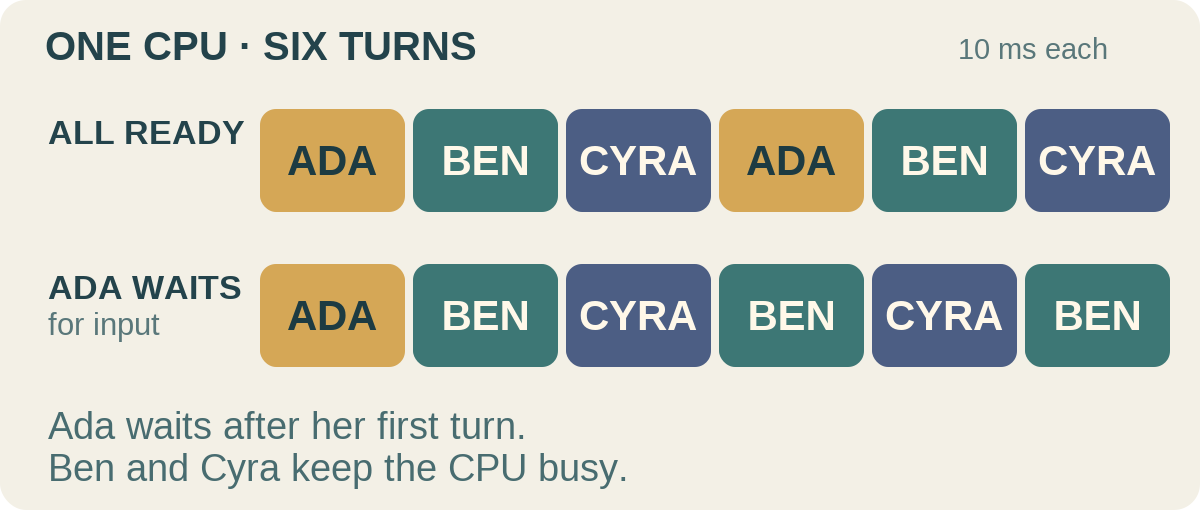
In the first row, after three turns, 30 milliseconds have passed and each process has received 10 milliseconds of CPU time. After six turns, 60 milliseconds have passed and each has received 20 milliseconds. If all three always need the CPU and we ignore switching costs, each receives 20 ÷ 60 = one-third of the CPU time. The CPU has still performed only 60 milliseconds of work in those 60 milliseconds. Taking turns improves access and response time; it does not create extra CPU power.
Now suppose Ada’s process waits for her next keystroke after its first turn. When its next turn would arrive, Ada is still typing, so the operating system gives the CPU to Ben instead. The next two turns go to Cyra and Ben. In the same 60 milliseconds, Ada uses 10 milliseconds, Ben 30 milliseconds, and Cyra 20 milliseconds. No CPU turn is wasted on Ada while she waits. When she finishes typing, her process can become ready again. The original MIT paper described short bursts of computation returning to each active user frequently enough for interactive work.
How a program keeps its place
At the end of a turn, the operating system must know where to resume the process. It saves a context: information such as the address of the next instruction and values held in the CPU’s registers, the small storage locations used while instructions run. It can then load another process’s saved context. This handover is a context switch. The process’s data does not vanish simply because another process gets the CPU. Operating Systems: Three Easy Pieces walks through the timer and context-switch mechanism in more detail.
How does the operating system regain control if a program never volunteers to stop? A hardware timer can signal that its turn has ended. The CPU then runs operating-system code, which can save the current process and choose another. A process may also give up the CPU earlier when it must wait for input or output. Early time-sharing machines needed suitable timer and memory-protection hardware; Fernando Corbató’s 1964 report discusses both requirements.
The telescope analogy has limits. Moving a real telescope between targets takes time; a computer can switch between processes quickly. The astronomer’s notebook stands for saved state. Modern computers also have multiple CPU cores, so some processes really can run at the same time; each core can still be shared among processes.
From batches to interactive use
Time-sharing did not spring from one person’s finished design. At MIT, John McCarthy and Herbert Teager advocated interactive access before the Compatible Time-Sharing System, or CTSS, was built. Fernando Corbató, Marjorie Merwin Daggett and Robert Daley described an experimental system in their 1962 paper. An early CTSS version was demonstrated in November 1961; after further development, it entered daily use at MIT’s Project MAC in 1963, according to MIT’s account.
Other groups explored time-sharing too. Ed Fredkin at Bolt Beranek and Newman and Jack Dennis at MIT developed a system demonstrated on a PDP-1 in September 1962. It used a magnetic drum to hold one user’s work while another used the machine, as the Computer History Museum describes. These projects differed in their machines and details, but they addressed the same practical question: how could several people get useful, timely access to an expensive computer?
Time-sharing made a computer less like a machine that returned a stack of results later and more like one a person could work with through a terminal. Its promise depended on load: if too many processes demanded CPU time continuously, each would wait longer, and saving and restoring contexts also used some time. The shared telescope offers the central picture: one resource, separate users, repeated turns, and saved state from which each task can resume.
Sources
- Corbató, Merwin Daggett and Daley, “An Experimental Time-Sharing System”, Proceedings of the 1962 Spring Joint Computer Conference, 1962. Original account of the problem, early system and short computation bursts.
- MIT CSAIL, “Corbato Named Computer History Museum Fellow”, 2012. CTSS demonstration and daily-service dates.
- Corbató, “System Requirements for Multiple-Access, Time-shared Computers”, MIT Project MAC report, 1964. Hardware requirements.
- Computer History Museum, “Timesharing”. PDP-1 demonstration and its designers.
- Arpaci-Dusseau and Arpaci-Dusseau, “Mechanism: Limited Direct Execution”, Operating Systems: Three Easy Pieces. Timer interrupts and context switching.
The observatory, astronomers and 10-millisecond schedule are invented teaching examples. The feature image and six-turn diagram illustrate those examples rather than a historical observatory or CTSS machine.